This case delivers a real, editable landing page for Clay Room, a fictional neighborhood ceramics studio. It has a responsive hero, original CSS vessel artwork, workshop section and visible keyboard focus. Open the rendered page or save its complete HTML source as index.html to run it locally.
The page is a first-party SkillPick demonstration, generated by our demo-asset script after a subject-specific plan and review. Its workshop navigation is rendered and usable; its contact link is a fictional mailto:[email protected]. There is no booking service, real studio address or working production contact destination.
Start with a narrow, truthful brief
The supplied fixture asks for workshop discovery as the main action. It does not supply dates, prices, ratings or customer stories. The implementation therefore labels its workshop as a demonstration listing and leaves dates and booking for a separate production step.
Build a single-page homepage for Clay Room, a fictional neighborhood
ceramics studio. Workshop discovery is the primary action.
Plan the visual direction before coding, then review it against the brief.
Use a cool blue glaze palette and original HTML/CSS vessel artwork.
Make an asymmetric two-column hero and one workshop row below it.
Stack the hero on mobile. Include visible keyboard focus.
Use no third-party images, testimonials, ratings, invented prices or dates.
The workshop action should navigate to #workshops. Include #visit.
Label the listing a demonstration. Use [email protected] only as
a clearly fictional mailto placeholder; do not imply connected booking.
Save all markup and styles in index.html with no build dependency.
This is a reproduction brief for the published artifact. If you ask an agent to generate a new page, the exact markup can vary. Downloading the supplied source gives you the actual implementation discussed here.
Install the design instructions
- Open Frontend Design and read the requirements, license and output example before downloading its ZIP.
- Extract the full skill folder. Keep
SKILL.md, supporting files and original notices together. Do not install only a copied fragment of its instructions. - Follow Your first agent skill and the guide for Codex, Claude Code or Cursor to choose the correct local skills directory.
- Start a fresh session, confirm availability, and give the agent the brief. Ask it to state a visual plan before creating the page.
The original application read the design instructions, selected a direction, reviewed the brief and wrote the artifact. That procedure does not establish automatic discovery across every agent product.
Why this page looks the way it does
The design plan rejected an all-cream-and-terracotta treatment in favor of a cool glaze background. Studio blue #143b52 carries the typography, pale blue #eff4f8 forms the page and #c8dfea frames the vessel. Clay #b56f44 identifies the material. The primary link uses #145976 with white text.
Georgia supplies the large editorial headline and body; system UI text handles navigation and actions. The vessel is drawn with CSS shapes, a pseudo-element rim and an inset shadow. There is no stock photography or externally loaded art. A two-column hero makes the headline and artwork peers on wider screens; the media query stacks them below 700 pixels.
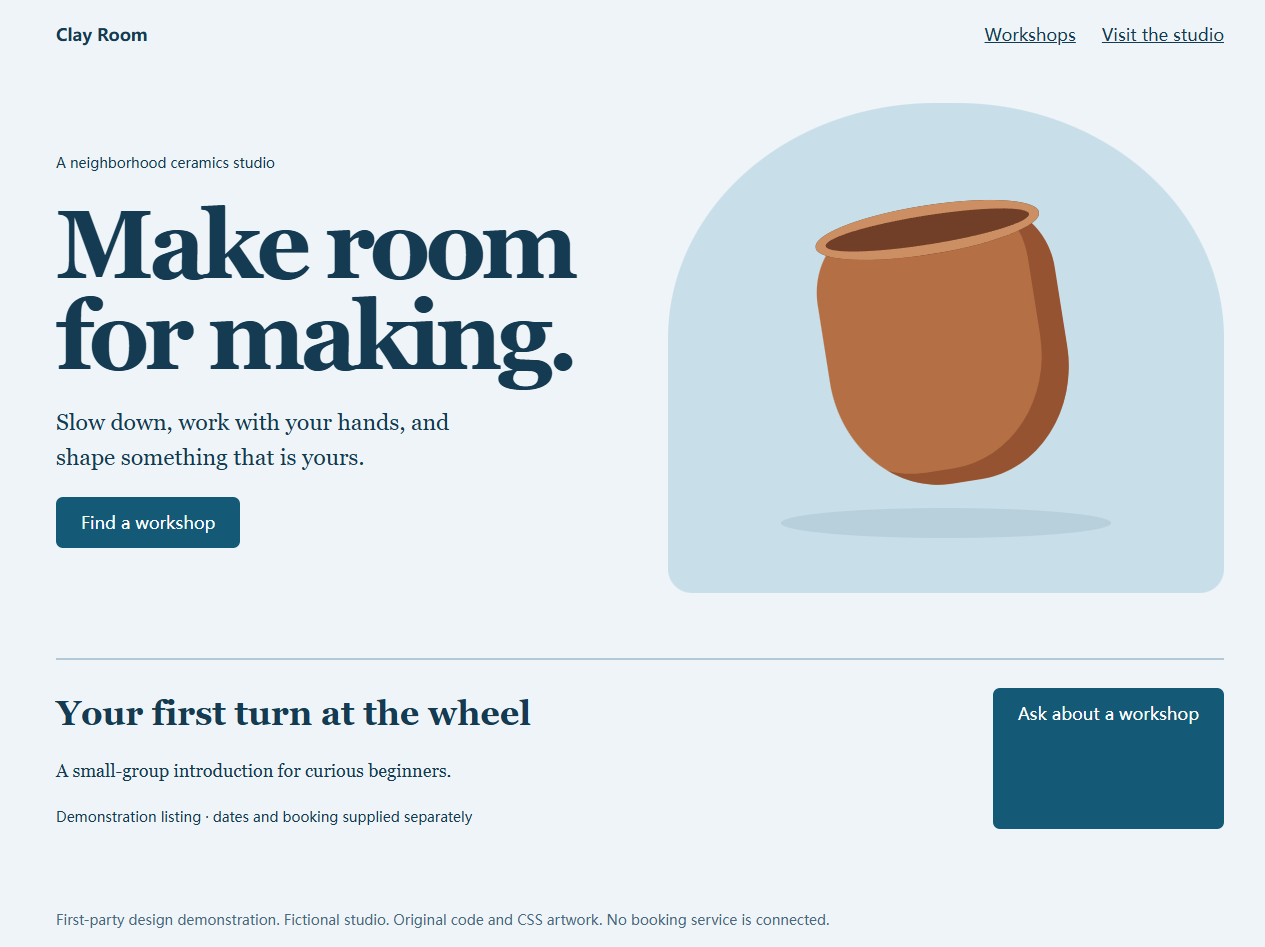
Inspect the original mobile screenshot. These are screenshots of the actual artifact, rather than a design-only mockup. Browser and installed-font differences can affect the exact appearance of your local copy.
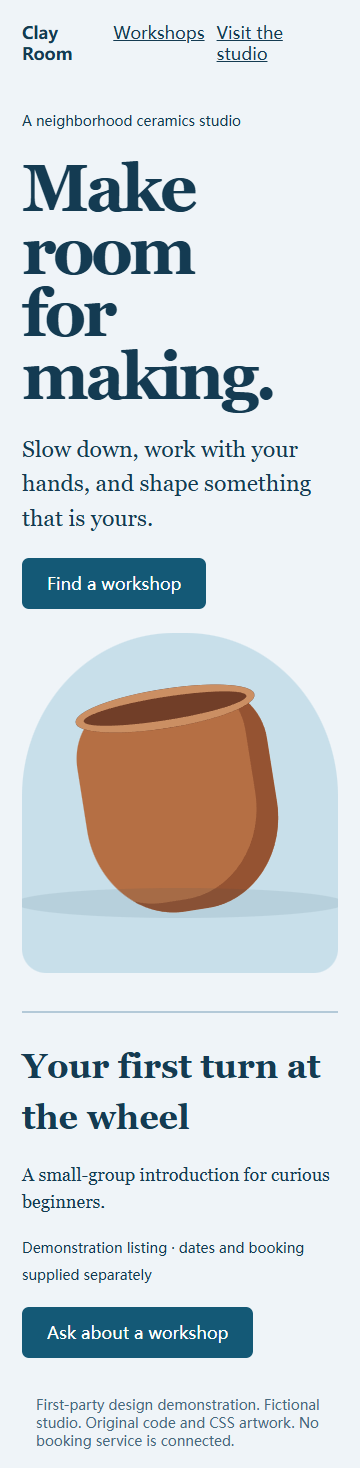
Run the exact source locally
Save the source text in a new folder as index.html; make sure your editor does not leave a second .txt extension. The single file includes its CSS and artwork. Python 3 provides a simple local server:
cd C:/path/to/clay-room
python -m http.server 8000
Open http://localhost:8000/ in a browser. If your Windows Python installation uses the launcher, the equivalent is py -m http.server 8000. No npm dependency or remote font is needed for this artifact. Stop the server with Ctrl+C when finished.
Check behavior at three widths
Use browser responsive mode at 360, 768 and 1440 pixels. During this case-study review, the standalone Clay Room page and the tutorial were opened at all three widths with no horizontal page overflow. The original design workflow also produced the linked desktop and mobile screenshots. Repeat the checks on your own copy after changing its text, artwork or layout; these observations do not certify every browser or an adapted production site.
- At 360 pixels, check that the hero stacks, the headline stays readable and the workshop CTA remains reachable.
- At 768 pixels, inspect the two-column transition, navigation spacing and vessel clipping.
- At 1440 pixels, check the maximum content width, visual hierarchy and workshop row alignment.
- At every width, click “Find a workshop” and “Workshops” to reach
#workshops; click “Visit the studio” to reach#visit. - Tab through every link and inspect focus. The mailto can invoke a mail application, but its
.invalidaddress cannot serve as a real contact inbox.
Before adapting this for production, replace the fictional copy with approved facts and connect each primary action to a tested destination. A real booking flow also needs availability, confirmation and failure handling appropriate to its service.
Tools, costs and common questions
You need your own configured coding agent, a text editor and a browser; Python is useful for the local server. The skill download is free. Agent or model/API costs are separate. The delivered HTML needs no paid image service or hosted backend. No conversion, performance or search-ranking uplift was measured in this exercise.
Can I edit it without running an agent? Yes. Download the HTML, save it as index.html and edit the text or CSS directly.
Is it a production booking website? It demonstrates a design and local navigation. Its workshop date and booking service are deliberately unspecified.
Why keep the skill folder if the page is one file? The folder supplies the instructions and notices used when applying the workflow. The HTML is the resulting artifact, with a different role.
Continue with website development and design skills, or compare the process with the weekly content plan and actual HyperFrames video.